
Our top product updates: self-serve antifraud, balances in Hub, Mastercard GMAP ratio, invoices via API, and more
Product
Updated 18 Nov 2026
7 min

Artem Sadurskyy
Chief Product Officer, Solidgate
Two months of giving you more control: build your own antifraud rules in Hub, see your balances and Mastercard GMAP ratio in Hub, pull invoices via API, and offer Klarna and GCash at checkout.
Fraud attacks don’t wait for a support ticket, and finance teams shouldn’t wait for a monthly report. This September and October, we added new ways to get paid, sharper fraud tools, and a clearer view of your money.
You can now build and test your own antifraud rules in Hub, see why every payment was passed or rejected, track your balances and Mastercard GMAP ratio, pull invoices via API, and offer Klarna and GCash to more customers.
Here are the most important updates from the past two months.
Offer Klarna at your checkout
Klarna, the everyday finance network, is now available on Solidgate. You're paid upfront, and Klarna assumes the transaction risk.
Klarna data shows that partners integrated to its technical standards typically see ~20% higher checkout conversion and ~40% larger average order value.
Now you can:
- Reach Klarna customers in 26+ markets
- Accept Klarna however you take payments – Payment Form, Payment Page, Payment Link, or API
- Issue full, partial, and multiple partial refunds
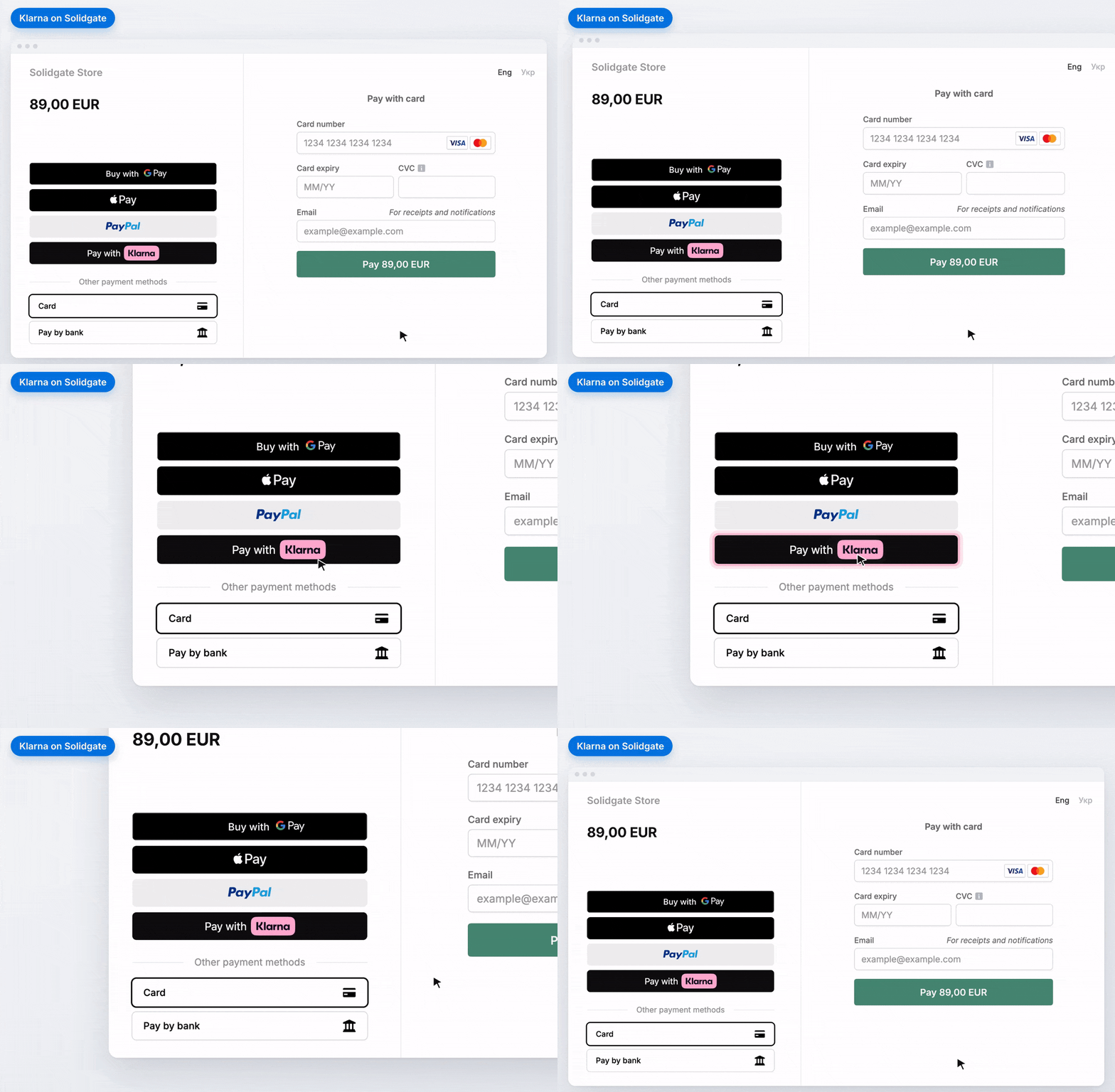
Also new in Hub: See all your APM connectors and connector accounts in one place. If you're onboarded to Klarna, open the Klarna Partner Portal straight from Hub, with no separate login.
Good to know: Customers confirm the payment once on Klarna's page, then return to your site.
Requirements: Your legal entity must be in the European Economic Area (EEA).
How to get started: Contact your account manager → complete a compliance review → go live.
Read more in our .
See your balances in Hub
Your balances now live in Hub, so you can check your funds, plan payouts, and reconcile whenever you need. They’re built on a ledger that records every fee, settlement, reserve movement, and payout, so every change is backed by a recorded entry.
You’ll see three balances per currency:
- Current – the funds held for upcoming settlements
- Reserve – the funds held to cover chargebacks, refunds, and fraud risk
- Total – Current and Reserve combined
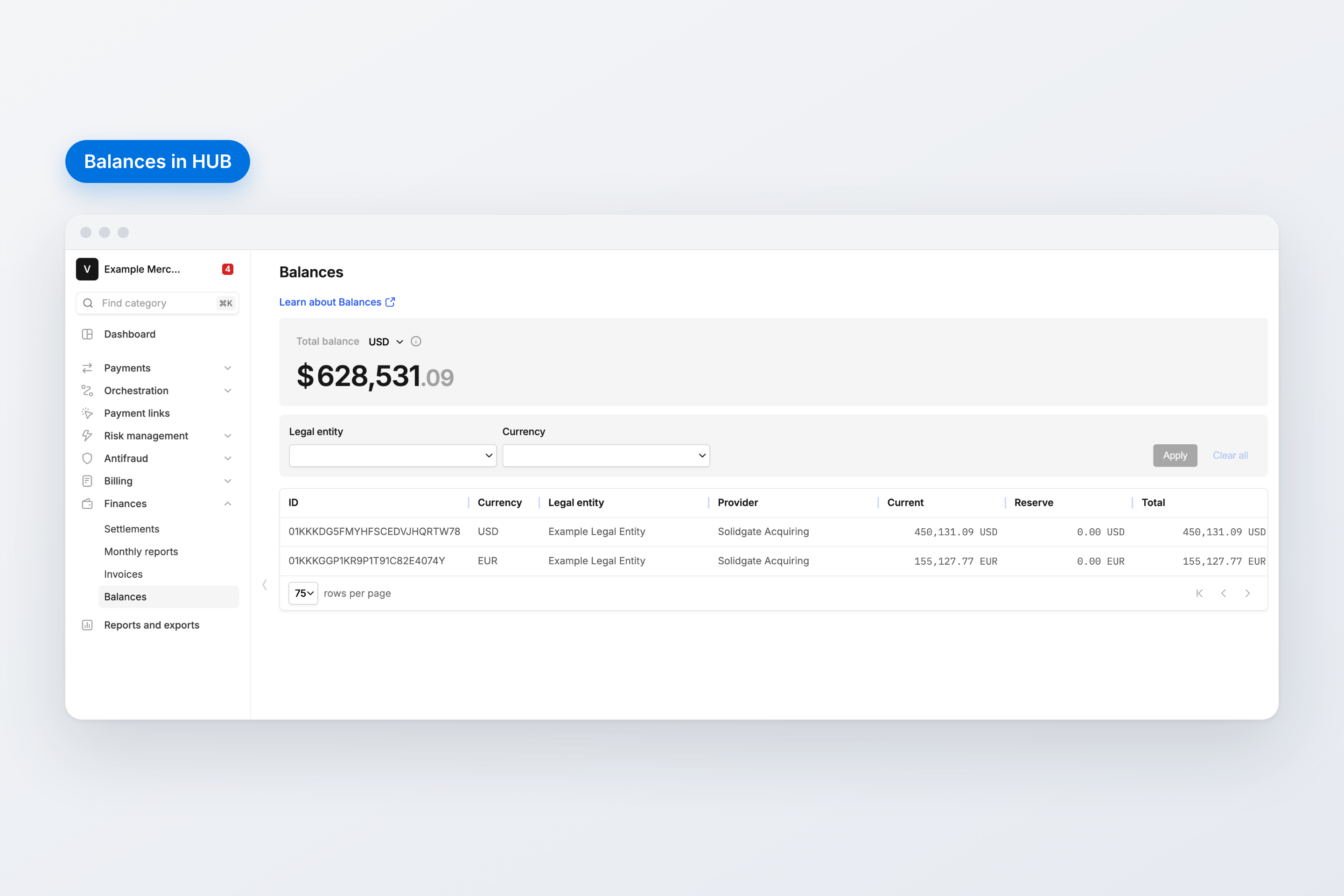
Good to know: Balances update daily at 14:00 UTC.
Availability: Available to Solidgate Acquiring merchants.
Read more in our.
Build and run your own antifraud rules in Hub
With Antifraud Self-Service, you create and adjust antifraud rules yourself in Hub, so you can react to fraud in minutes and fine-tune your setup as your traffic changes.
Rules run on a new, more flexible model: you build conditions from Fields, a shared catalog of payment attributes and aggregations.
What you can do:
- Create and deactivate rules that pass, reject, force 3DS, or send a payment to review
- Combine several aggregations in one rule – for example, payments per BIN, device, or IP over windows from minutes to months
- Test a rule in shadow mode on live payments to see how often it would fire, and track hits for every rule
- Follow every decision on the new Antifraud overview: passed, sent to review, forced 3DS, and blocked
- Group items into dedicated lists, including custom lists your rules can reference
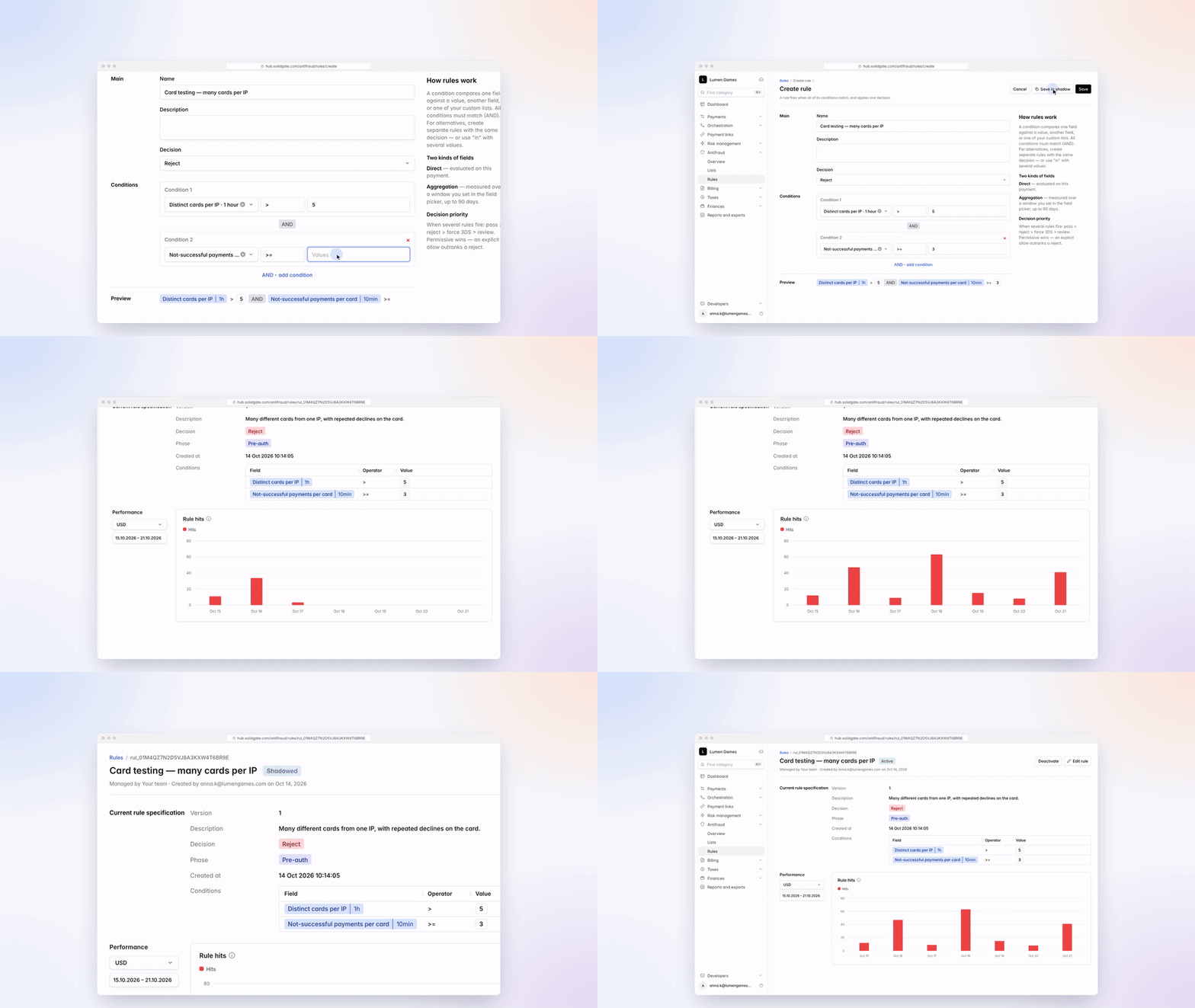
How to get started: In Hub, go to Antifraud > Rules and select Create rule. Test the rule in shadow mode first. When the results look right, switch it to active.
Availability: Available to all merchants, included in Antifraud at no extra cost.
Good to know: Rules managed by Solidgate appear right next to yours, so you see your full setup in one place.
Read more in our.
Reach shoppers in the Philippines with GCash on Payment Form
GCash is the most widely used e-wallet in the Philippines, and it now joins the APM buttons on your Payment Form, in addition to Payment Link. Offer it to customers in the Philippines and let them complete their purchase with the wallet they already use.
What it brings:
- Charge follow-up and subscription payments with the same token, as the first payment sets up a mandate
- Collect any missing customer details (email, full name, phone number) right in the form, so fewer customers drop off at checkout
- Show the GCash button above your Payment Form or in a custom container
- Issue full, partial, and multiple partial refunds whenever you need them
Good to know: Available for payments in Philippine pesos (PHP).
How to get started: Contact Solidgate support to set up GCash for your channel, then turn on the button in your Payment Form.
Read more in our.
Track your Mastercard GMAP ratio next to VAMP
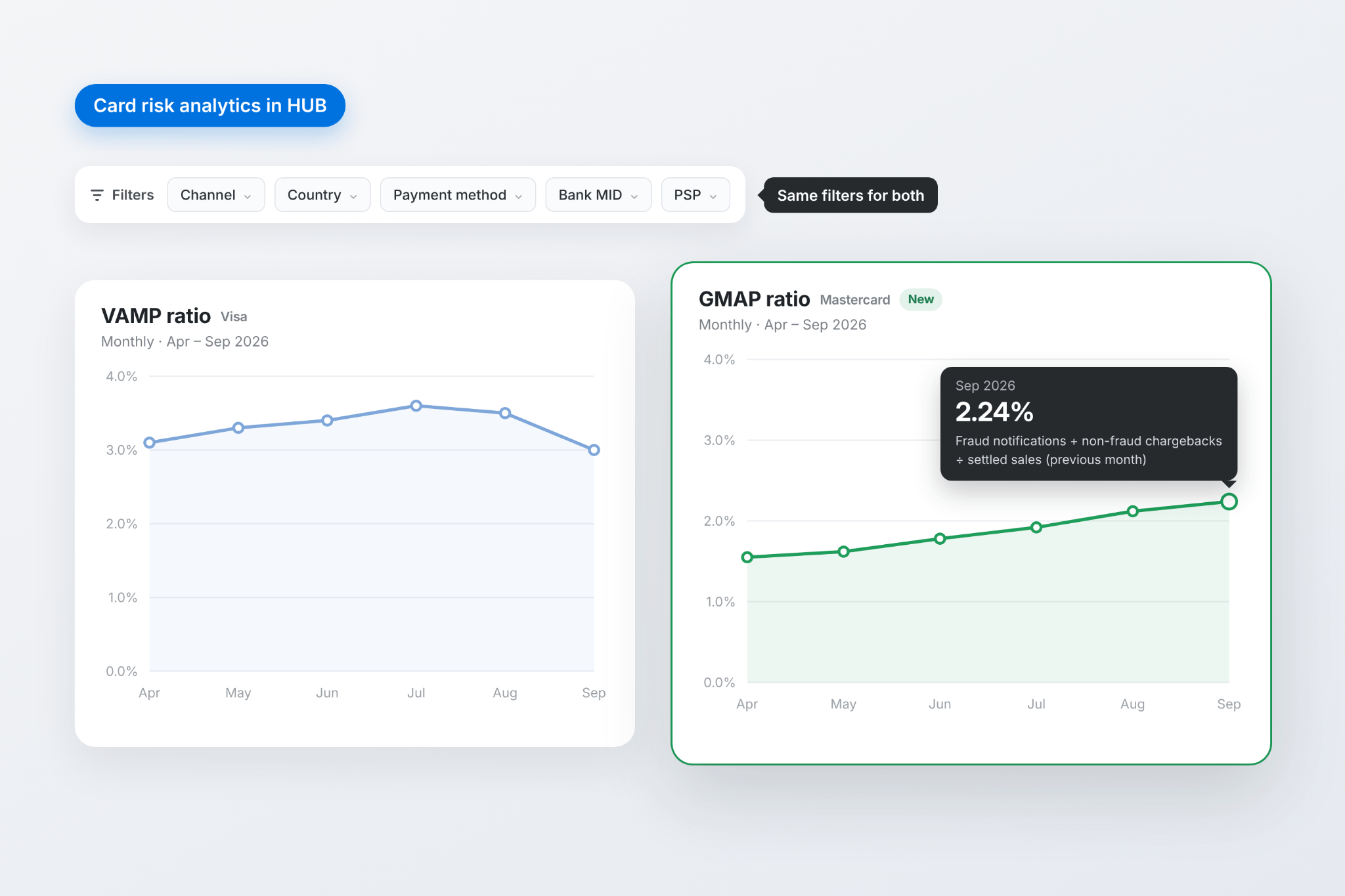
From April 2027, Mastercard’s Global Merchant Audit Program (GMAP) can lead to fees, lower approval rates, and fraud liability for merchants above its thresholds. You can now see where you stand with both card schemes in one place: Card risk analytics in Hub shows your GMAP ratio next to your Visa Acquirer Monitoring Program (VAMP) ratio, so you can spot a rising ratio while there’s still time to act.
What it brings:
- See your GMAP ratio by month for any period you select
- Narrow both ratios down by channel, country, payment method, descriptor, bank MID, connector account, or PSP
- Check how it’s calculated right in the chart tooltip: Mastercard fraud notifications and non-fraud chargebacks this month, divided by settled sales last month
Good to know: The ratio is calculated monthly and works as an early indicator, so you can act well ahead of Mastercard’s own review. Available to all merchants with Card risk analytics in Hub.
Read more about in our documentation, and about on our blog.
See why every payment was passed or rejected
Get the full reasoning behind every Antifraud decision, straight in your own systems. The new Antifraud result webhook lists every rule and list item that shaped each decision. With the Antifraud self-service rules, you can create your own rules and see how they fire.
With this update, you can:
- See why each payment was passed, rejected, forced to 3DS, or sent to review
- Find every matched rule – including rules in shadow mode – by its ID in Hub and adjust it
- Keep a record of every Antifraud decision for support, reporting, and audits
- Get pre-authorization and post-authorization checks as separate results
How to get started: Subscribe to the ANTIFRAUD_RESULT_CREATED event in your Hub webhook settings. Available to all merchants on Public API v2, included in Antifraud at no extra cost.
Good to know: Your existing integration does not change. The Antifraud result webhook is a separate event, and your payment webhooks stay the same.
Read more in our.
Pull financial invoices via API
Financial invoices are now on Public API v2, alongside settlements. Pull invoices from Solidgate and connected providers straight into your accounting, tax, and audit workflows, and close the month faster with the fee breakdown by provider, legal entity, and currency already in your own systems.
Now you can:
- Retrieve a list of invoices, filterable by legal entity, currency, invoice period, or upload date
- Fetch full details for each invoice, including its files in CSV or PDF via secure, pre-signed URLs
- Access invoice history from August 2025 for Checkout and Solidgate Acquiring, and from February 2026 for Adyen
Requirements: Public API v2 access. Contact your account manager to activate it.
Read more in our .
Send receipts and invoices from your own domain
Customers trust emails from a brand they recognize. You can now send payment receipts and tax invoices from an email address at your own domain, for example, noreply@yourbrand.com. This helps if you have brand, compliance, or partnership rules for sender domains. Solidgate handles the setup. You only add a few DNS records.
What you can do:
- Keep your brand in front of customers, from checkout to inbox
- Set a custom sender name and address for each channel
- Count on every email being delivered: if anything changes with your domain, emails are held, never sent from another address, and resent once it’s back
Requirements: Payment receipts turned on for the channel.
Good to know: Your emails keep coming from the default Solidgate address until your domain is active, so setup does not interrupt delivery.
How to get started: Contact your account manager and add the DNS records we send you. We then verify the records and activate your domain.
Take more control over your subscription prices
As you test new currencies, regions, and offers, your price list grows. You can now manage each price individually, in Hub and via API: update unused prices without creating duplicate products, and retire the ones you no longer offer.
Now you can:
- Edit the amount, currency, country, or trial price of any recurring price with no active or paused subscriptions, even if other prices on the same product are in use
- Archive prices you no longer offer: they’re removed from new subscriptions, while existing subscribers keep billing uninterrupted
- Replace a price by creating a new one for the same currency and country, then archiving the old one
Good to know: If you archive the last active price for a currency, add a replacement to keep accepting new subscriptions in that currency.
Read more in our.
Find the right data faster with new Hub filters
The new Hub filters follow one consistent logic across every page, and you decide what you see. Whether it’s a daily check or month-end reporting, your team gets to the right data in fewer clicks.
What you can do:
- Switch between Essential, Default, and Advanced presets in one click, or save your own for recurring checks
- Choose which filters to show, drag them into your preferred order, and find any of them by search, with a hint on each one
- Collapse the filter panel to give the table more room, while still seeing how many filters are active
Good to know: Custom presets and filter order are saved in your browser, so they don’t carry over to another device.
Thank you for checking what’s new. For a complete overview, check our and stay updated on.