Routing 2.0 is out of Beta and open to every Solidgate merchant
Product
Updated 17 Nov 2026
7 min

Anton Tsyslytskyi
Product Manager, Solidgate
Routing 2.0 is now available to every Solidgate merchant. Build routing rules yourself, recover declines with cascades, and route every payment type.
More approved payments, fewer declines lost for good, and routing you can change yourself in minutes. That's what our Routing 2.0 gives you. Cascades alone recover about 8% of declined payments on average. When you want to send payments somewhere else, you do it in Solidgate Hub, without a support ticket or waiting on developers.
After a year in and 25+ releases shaped by our clients, Routing 2.0 is now available to every Solidgate merchant. It covers cards, Apple Pay and Google Pay, your own network tokens, and subscription renewals.
Here's what you can do with it now.
Easy to start, even if routing is new to you
You don't need a payments team of ten to set up . Routing 2.0 walks you through the parts of payment processing that are easy to miss.
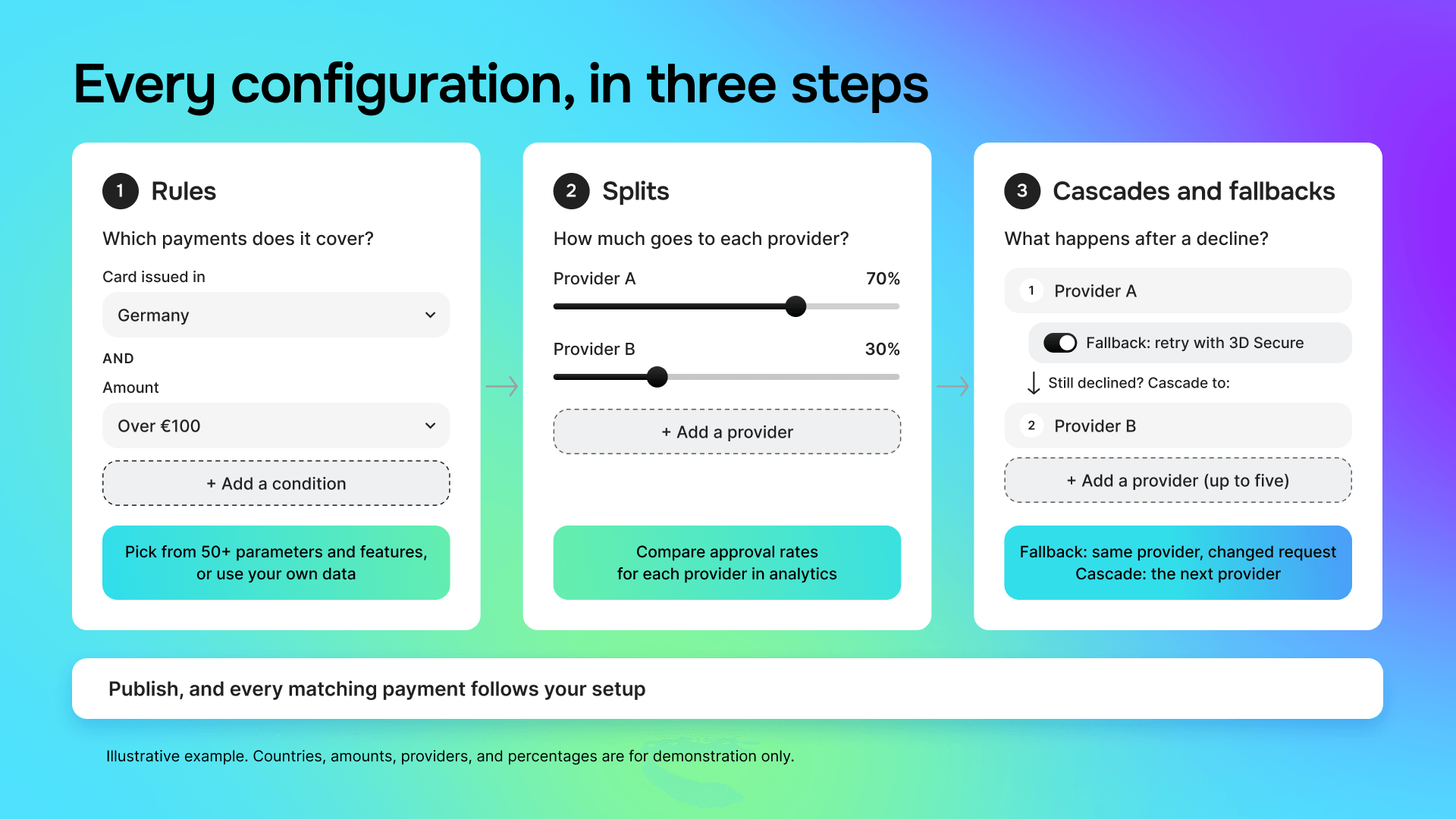
Every configuration is built the same way, in three steps:
- Rules decide which payments a route covers. For example, “cards issued in Germany, over €100.”
- Splits divide those payments between providers by percentage. For example, 70% to one provider and 30% to another.
- Cascades and fallbacks decide what happens after a decline. A cascade sends the payment to the next provider, up to five in a row. A fallback sends it again to the same provider with a small change, such as an extra 3D Secure (3DS) check.
You don’t start from a blank page. Ready-made presets cover common cases, such as blocking certain payments or sending them through 3DS for an extra check. Each connector also shows which payment methods and 3DS options it supports, so you choose only from providers that can handle the payment.
Along the way, Routing 2.0 helps you avoid common mistakes:
- Step-by-step guides walk you through connecting providers such as Adyen, Checkout, Stripe, and Worldpay.
- The step list shows only connector accounts (also known as MIDs, or merchant IDs) linked to your website, so payments don’t land in the wrong account.
- Add a network token step without a card fallback, and you’ll get a prompt to add one.
Read more in our.
Route cards, wallets, network tokens, and renewals from one place
Whatever your customers pay with, you can route it: cards, Apple Pay and Google Pay, your own network tokens, and recurring payments. Each payment type has its own setup, and all of them work the same way, with rules, splits, and cascades. Learn it once, and you can route everything.
| Payment type | What you can do now |
| Cards | Route by country, card, amount, or your own data, with 50+ parameters and features. Split traffic and cascade across connector accounts. |
| Apple Pay and Google Pay | Use the same rules, splits, and cascades as cards, with a separate branch for Google Pay PAN-only payments. |
| Your own | Route tokens issued outside Solidgate, such as Visa and Mastercard tokens or Apple Pay and Google Pay card-on-file tokens, with the same logic as cards. |
| Send renewals to another connector account, or keep them on the first one with your own method order, descriptor, and rules. |
Apple Pay and Google Pay payments get a second chance
A declined Apple Pay or Google Pay payment doesn’t have to be a lost sale. If the first provider declines it, Routing 2.0 sends the payment to the next provider on your list. You can line up to five providers in a row, the same way you do for cards.
For example, a customer in France pays with Apple Pay. Your main EU provider declines. Routing 2.0 tries a second EU provider, and if that one declines too, a US provider.
You set this up in a separate configuration for digital wallets, with the same rules and splits as for cards. Google Pay payments made with a regular card number get their own branch, with their own 3DS settings. Only providers that support Apple Pay and Google Pay appear in your list.
Renewals get their own route
With Solidgate Token configurations, you decide where renewals go. Move subscribers to another provider without asking customers to re-enter their cards. If a renewal fails, Routing 2.0 retries it with another saved credential, such as a network token or card on file, or through another provider. A default recurring strategy keeps renewals running even if you haven’t set up any rules yet.
Recover more declined payments with cascades and fallbacks
When a payment is declined, there are two ways to save it. Sometimes another provider will approve it. Sometimes the same provider will approve it if you send it again with a small change, for example, with an extra 3DS check. Routing 2.0 can do both.
Cascade a declined payment to the next provider
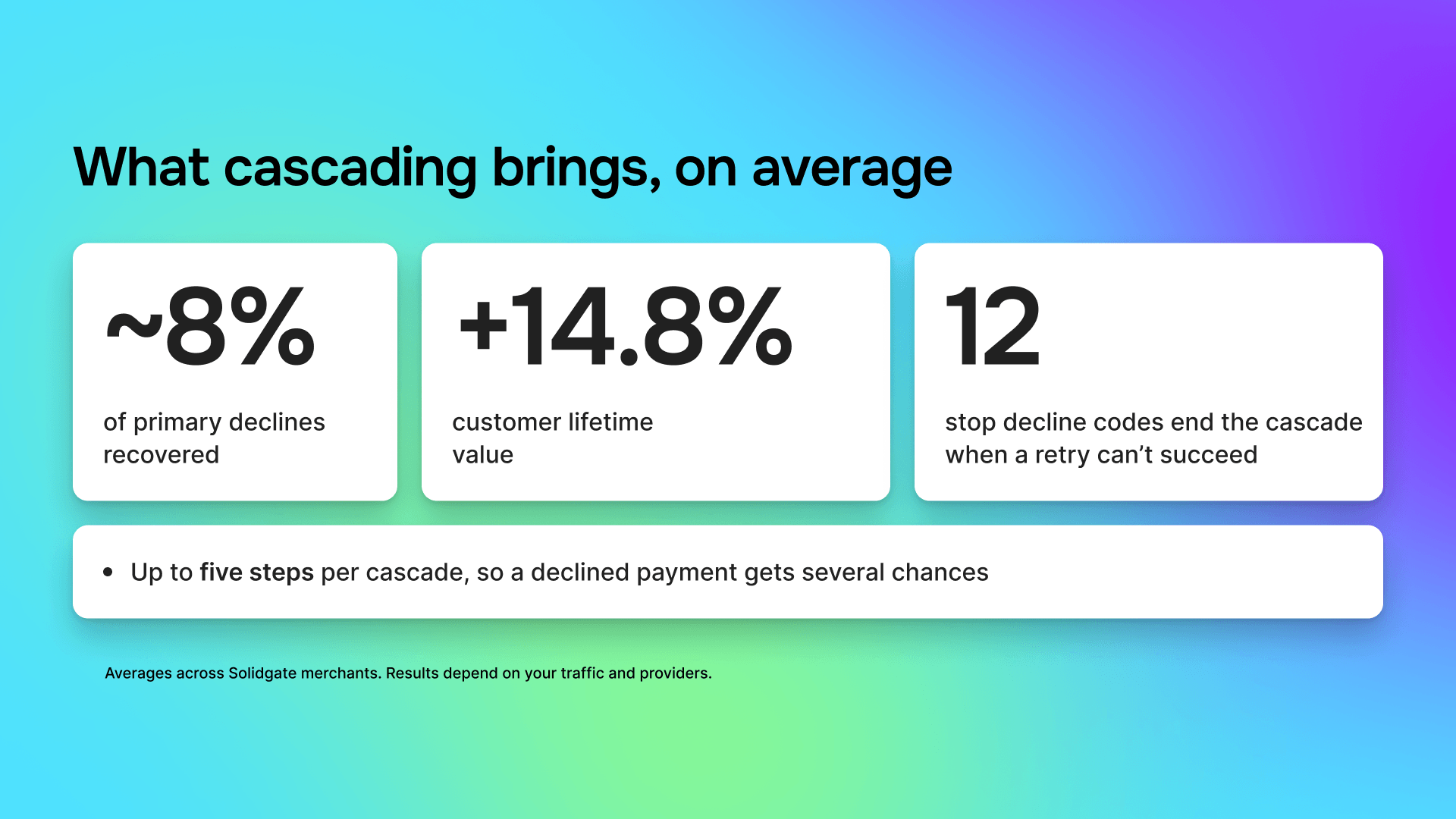
Build of up to five steps per segment. On average, cascading recovers about 8% of primary declines and adds 14.8% to customer lifetime value. When a decline can't be recovered, such as a stolen card or a closed account, one of 12 stop decline codes ends the cascade, so you don't pay for retries that can't succeed.
Retry with 3DS or saved card details
Sometimes the same provider will approve a payment if you send it again with a small change. Built-in fallbacks do this for you:
- A payment your customer makes without 3DS gets a soft decline? Routing 2.0 sends it again, this time with 3DS.
- A payment that skipped 3DS under a low-risk exemption fails? Routing 2.0 sends it again with the full 3DS check.
- A network token doesn’t work? Routing 2.0 tries the customer’s saved card details instead, such as their card on file.
You turn on each fallback in the step settings, and the routing log shows which one ran. No need to build these retries yourself.
Ask for 3DS only once
Every extra 3DS check is one more moment when a customer can give up on the purchase. With Routing 2.0, your customer confirms the payment only once, on every provider that supports 3DS cascading.
Stop silent declines on prepaid and Maestro cards
Non-reloadable prepaid cards often fail without a clear signal. A new card reloadable condition lets you route them separately to the provider that handles them better. Maestro payments now go through 3DS by default, so they don't fail on connector accounts without 3DS.
Test connectors head-to-head
Not sure which provider works best for a group of payments? Test them on your own traffic.
For example, take all card payments from the UK and send 50% to one provider and 50% to another. Once enough payments have gone through, Orchestration analytics shows the approval rate for each half of the split, so you can see which provider approves more. Then send more traffic to that provider, or keep testing with a new one.
Build large setups in minutes, not days
Some businesses sell through several websites or apps. Each one has its own payment setup, called a processing channel, and each channel can have hundreds of routing rules. Replacing one provider across all of them by hand can take hours.
Routing 2.0 lets you make changes like this in one go:
| The manual way | With Routing 2.0 |
| Select 27 EU countries one by one, in every rule | Save them once as a value group and pick it in any rule. Edit the group, and every rule updates. |
| Replace a provider account by editing every rule | Replace provider accounts and dynamic descriptors across a whole configuration from one screen |
| Rebuild the same setup for each website or app | Copy a configuration to your other channels, with the right provider accounts picked for each one |
| Scroll and zoom to find one rule | Use the sidebar, filter routes by up to four parameters, or search by configuration, version, route, or analytics ID |
Bulk changes never go live on their own. Each one creates a draft, conflicts block saving until you fix them, and you publish when you’re ready. Every configuration keeps its version history, so you can roll back if something goes wrong.
Read more in our.
See every routing decision
Payments teams ask the same questions every week. You can answer all of them yourself in Hub.
- “Why did this payment go to that provider?”
Open the routing log in the order details. You’ll see which provider processed the payment, which ones it skipped and why, and whether 3DS was used. - “Which route approves the most payments?”
Orchestration analytics shows approval rates for every route and provider, plus the reasons payments were declined and the results of your split tests. - “What happened across all my payments last month?”
Export the routing events report. It lists every routing decision, one row each, for any period of up to 36 days, so you can analyze it in your own tools. - “Can our systems track routing changes automatically?”
Yes. Export routing configurations through API v2 and get a webhook every time someone publishes a new version. Your account manager can turn on API v2 access for you.
Read more in our.
What's next
Next, we’re making splits smarter. With Smart Splitting, your traffic split will adjust on its own, sending more payments to the provider that approves more, always within the rules you set. A first group of merchants is already using it, and we’ll share more soon.
How to get started
Routing 2.0 is available to all Solidgate merchants. If you already process payments with us, contact your account manager to get started. They’ll move your processing channels to Routing 2.0 one at a time. The switch needs no work from your developers, and you can move a channel back at any point. Once a channel is on Routing 2.0, you build and publish its routing rules yourself in Solidgate Hub.
If you don’t work with Solidgate yet, with our team. We’ll look at your current payment setup and your declines together, and show where Routing 2.0 could help you approve more payments.
Frequently asked questions
Every online payment goes through a payment provider, a bank, or a company that approves or declines it. If you work with several providers, something has to decide which one gets each payment. Routing 2.0 makes that decision for every payment, based on rules you set yourself in Solidgate Hub. For example, you can send payments from Brazil to a Brazilian provider. If a provider declines a payment, Routing 2.0 can send it to the next one on your list.
Solidgate Routing 2.0 supports cards, Apple Pay, Google Pay, merchant-managed network tokens, and recurring payments.
40+ connectors, including Solidgate Acquiring, Adyen, Stripe, Checkout, and J.P. Morgan. You can use your own merchant accounts, with no provider lock-in.
No. You build and publish rules in Hub. Developers can use API v2 and webhooks to track configuration changes in your own systems.
You switch one channel at a time, and you can switch back. Every change starts as a draft, and you can roll back to an earlier version.