The checkout optimization guide: 7 strategies that lift conversion
Payments 101
Updated 2 Sept 2026
14 min

Andrii Kononenko
Head of Merchant Operations, Solidgate
Most checkout optimization stops at what's visible. Here's what to do when the numbers don't move.
7 in 10 shoppers before paying. That number has been stable for years because most checkout optimization stops at the visible layer: form fields, button placement, or mobile layout.
The businesses that meaningfully optimize their checkout conversion rate aren't just redesigning forms. They're finding the gaps that standard analytics doesn't surface:
- Authorization rates that quietly drop 8–10 points in a new market
- Subscription renewals failing because an expired card was never retried
- Payment methods missing for customers who need them most
Checkout optimization, done properly, covers the three layers: UX friction, payment authorization, and subscription resilience.
This guide covers seven strategies across all the layers – what to measure first, where the biggest gaps actually are, and what it takes to fix them.
TL;DR
- 7 in 10 shoppers abandon checkout before paying. The causes are predictable: unexpected costs, missing payment methods, and form friction but the fix depends on your business model.
- Checkout optimization spans three layers: UX friction (form design, mobile, pricing transparency), payment authorization (routing, decline recovery), and subscription resilience (retry logic, network tokenization, card updater). Most teams only work on layer one.
- Authorization rate and subscription renewal gaps are typically larger revenue opportunities than form design but they require payment infrastructure, not just UX changes.
- Network tokenization (VTS/MDES) improves authorization rates by up to 15% and reduces involuntary churn by up to 7.5% with no added friction for returning customers.
What is checkout optimization?
Checkout optimization is the process of reducing friction at every step of the payment flow – from checkout page to order confirmation. The goal is to maximize the share of customers who complete a purchase.
It covers:
- Form design – field count, autofill, error handling, and input types
- Localization – currency, language, and (APMs) adapted to each market
- Pricing transparency – showing total costs, taxes, and trial terms before the payment step
- Trust and security signals – SSL indicators, PCI DSS compliance, recognizable billing presence
- Mobile experience – touch targets, native keyboard types, one-tap wallet payments
- Returning customer experience – saved payment credentials, network tokenization, pre-filled fields
- Authorization rate optimization – routing logic, retry strategy, and decline recovery
- Post-purchase experience – confirmation page, billing expectations, and upsell timing
Checkout is one component of . For the broader picture, see our guide.
Why checkouts fail
identifies the following main reasons customers leave at checkout.
Extra costs. The single biggest driver, at 39%. Customers who arrive at checkout with a number in mind encounter a different total – taxes, fees, or VAT that weren't visible earlier. The customer was willing to pay, but the checkout showed them a number they didn't expect. For subscription businesses, this translates to trial-to-paid charges and VAT appearing at the last step rather than at signup.
Forced account creation. 19% of shoppers abandon when required to register before purchasing. The customer has decided to buy, and a sign-up form breaks that momentum at the worst possible moment. Guest checkout removes this friction entirely and an email address can still be collected after the purchase.
Trust and security concerns. Another 19% don't trust the site with their card information. Standard security signals – SSL certificates, recognizable payment logos – address part of this. For subscription merchants, the concern runs deeper. Customers want to know whether a recurring charge will appear on their statement under a name they recognize and whether they can cancel.
Checkout length and complexity. 18% cite a too-long or too-complicated checkout. The 11.3 form fields but most need only 8. Every unnecessary field is a decision point that can lose a customer who was ready to pay.
On mobile, that complexity compounds. Cart abandonment – six points above desktop. On a small screen, extra fields take longer to complete, errors are harder to recover from, and a slow page load ends the session before the customer submits.
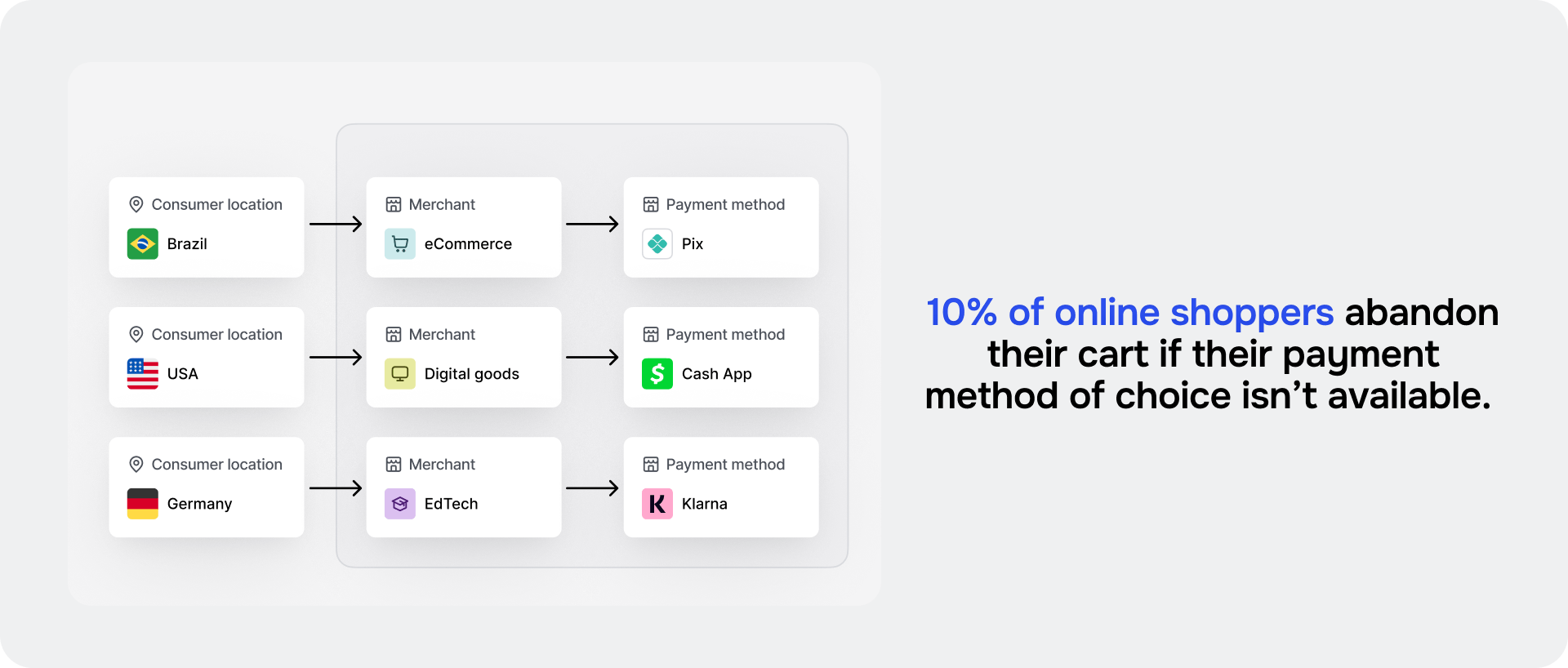
Missing payment methods. 10% of shoppers abandon when their preferred method isn't available. That figure understates the local impact. In markets where one local method dominates – BLIK in Poland, iDEAL in the Netherlands, PIX in Brazil – missing it costs far more than 10%. Customers who prefer it don't switch to an international card; they leave.
→ For ecommerce merchants, this is usually the largest recoverable leak: shoppers with clear purchase intent walking away over a missing option. Closing it is where our starts.
Core insight: Checkout failure is predictable. The same causes repeat across businesses but the form they take, and the fix they require, depends on your business model.
What to measure before you optimize
Before touching anything in your checkout, establish a baseline across the following metrics.
Cart abandonment rate measures the percentage of shoppers who add items to cart but don't complete a purchase. Track it as your top-level signal: when your rate consistently runs above the industry average (~70%), that's the signal to investigate. It won't tell you where the problem is – but it tells you there is one.
Checkout conversion rate measures the percentage of customers who start checkout and complete a purchase. Where rate tells you whether there's a problem, checkout conversion rate tells you how significant it is – and narrows where in the flow it lives.
If your rate is consistently low, compare it against your checkout initiation rate first – the percentage of visitors who begin the checkout process at all. If initiation is healthy but completion isn't, the problem is inside the checkout – not earlier in the funnel. Session recording then shows you exactly where users are dropping off.
Mobile checkout conversion measures how your checkout performs specifically on mobile devices versus desktop. A significant gap between mobile and desktop conversion rates points to mobile UX as the constraint – form fields, layout, or load time.
Payment method success rate tracks which payment methods are completing successfully and which are generating declines or abandonments. A low success rate on a specific method points to routing, integration, or coverage gaps.
Time to complete checkout measures how long it takes from checkout initiation to order confirmation. Long completion times signal form friction, navigation confusion, or insufficient autofill support.
Form field count tracks the number of input fields your checkout requires by default. Reducing optional fields is one of the highest-return single changes in checkout process optimization – most checkouts carry more than they need.
Authorization rate tells you whether submitted payments are actually clearing. If you're below your expected range, revenue is leaving after customers have tried to pay – a payment infrastructure problem, not a UX one. Look at decline code distribution to find the specific fix: "Insufficient funds" points to retry logic and "Expired card" needs account updater.
False decline rate measures the percentage of legitimate transactions that were incorrectly declined. These are customers who tried to pay and were turned away – revenue that was never recovered.
Core insight: Checkout performance spans three measurable layers – funnel UX, payment infrastructure, and device experience.
7 checkout optimization strategies to lift conversion
The seven strategies below address checkout friction across three layers. The first is UX – form design, pricing transparency, mobile experience, trust signals, and localization. The second is authorization rate – how well submitted payments clear after the customer hits pay. The third is subscription resilience, keeping recurring payments active after the initial transaction succeeds.
Most optimization work stops at layer one. The businesses that recover the most revenue work across all three.
1. Simplify the checkout experience
Fewer fields, fewer decisions, fewer reasons to stop. The checkout form is where most unnecessary friction lives. If your current flow asks for information you don't need for order fulfillment, that field is costing you conversions.
Remove optional fields from the default view – phone number, company name, date of birth, unless your business requires them. Pre-fill what you already have on returning customers. Don't require account creation before purchase – an email address can always be collected on the confirmation page.
For multi-step flows, show customers where they are in the process – a simple step counter removes the uncertainty that drives mid-checkout abandonment. Every step without a progress indicator is a step where the customer doesn't know how much further they have to go.
Clear, field-level error messages are the last line of defense. A form that fails after the customer completed every field is the worst possible exit point. "Card number must be 16 digits" is more useful than "Payment failed." Most drop-off at the payment step is failed error recovery.
Most checkout flows can trim their form elements by with no loss of fulfillment information.
2. Localize checkout
Checkout localization means adapting currency, language, payment methods, and tax presentation to each market you operate in. A checkout that treats every market the same drops conversion rates in every market that isn't your home one.
Currency. Display prices in the customer's local currency, calculated in advance – not converted at checkout. A customer who has to mentally convert a foreign price is less likely to complete.
Language. The checkout form language should match the user's locale. A form asking "Nom complet" rather than "Full name" signals to a French customer that this product actually serves their market.
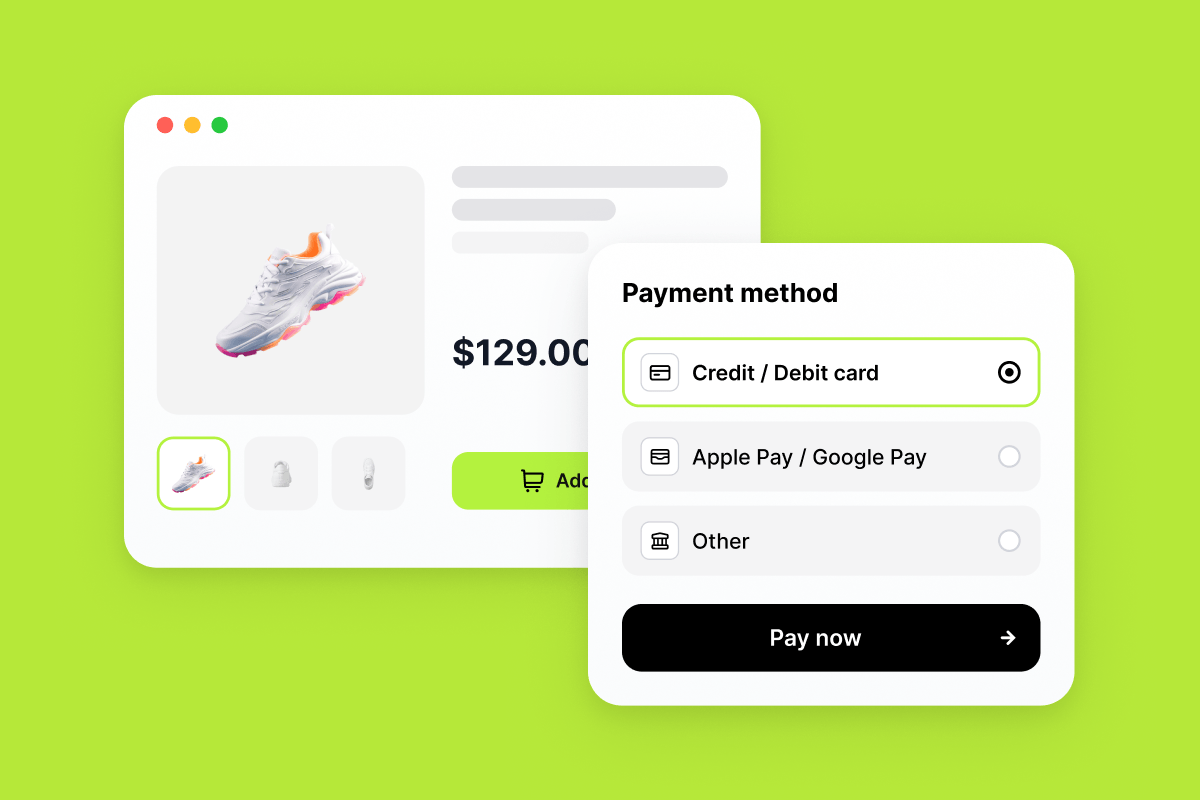
Payment methods. Support the methods your customers use, by market. rates are directly affected by method coverage – a customer who doesn't see a familiar option at checkout won't look for an alternative.
Preferences vary significantly by region:
- Brazil: PIX, Boleto
- Netherlands: iDEAL
- Poland: BLIK
- India: UPI (Unified Payments Interface)
- Southeast Asia: GoPay, GrabPay, ShopeePay, MoMo
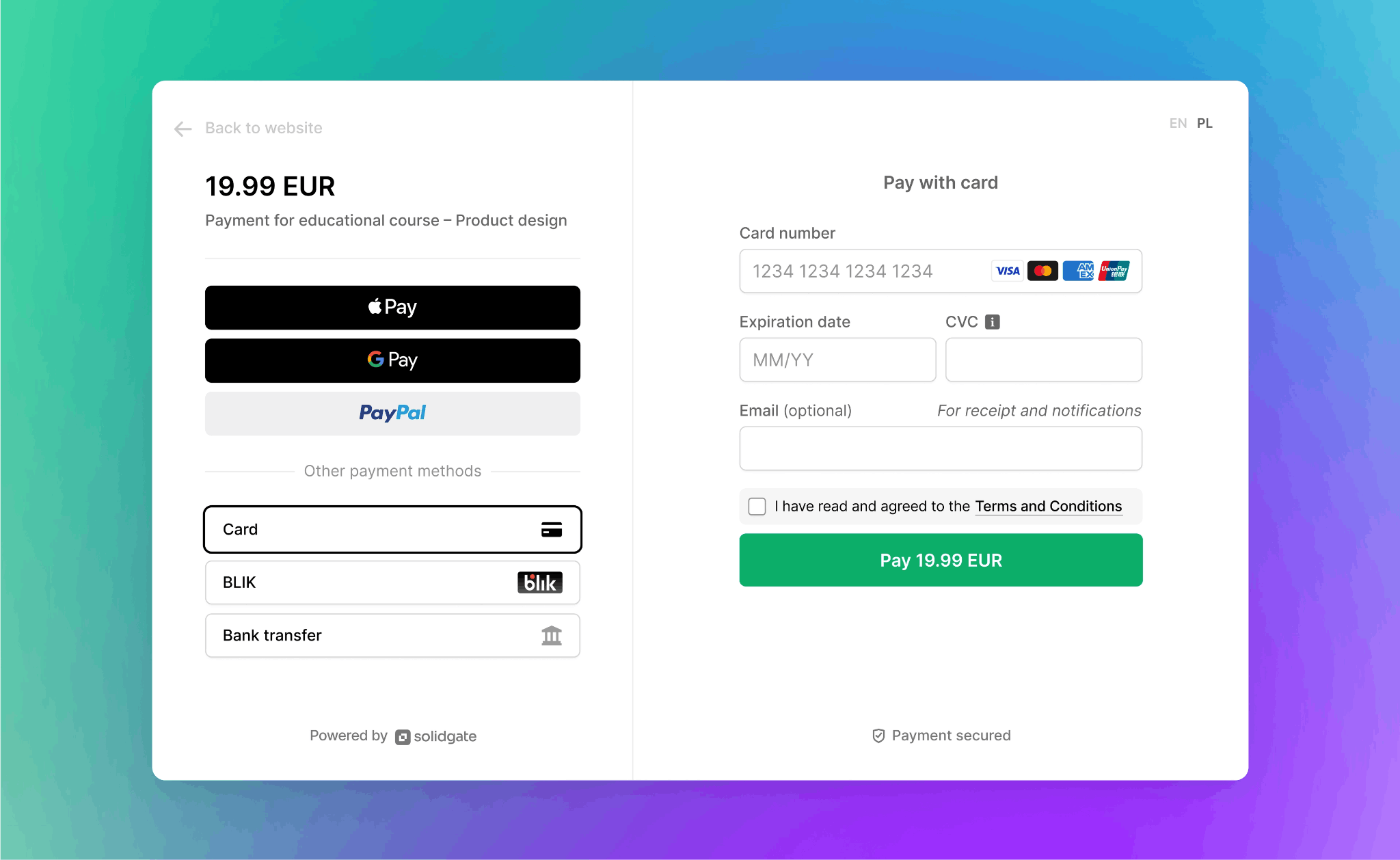
The problem is, integrating local payment methods one by one – separate APIs, separate contracts, separate reconciliation formats – adds months to every market entry. Payment orchestration removes this complexity by connecting to multiple APMs through a single integration.
For instance, , an AI-powered SaaS platform, found that PayPal was missing from their checkout entirely despite being the preferred payment method of their core segment. Adding it through their orchestrated stack opened a new customer segment and optimized checkout conversion, making Zeely Solidgate's largest PayPal US merchant.
Tax compliance. EU markets require tax-inclusive pricing by regulation. Show the applicable rate and the compliant total as a standard part of the localized checkout layout.
3. Show total costs before the payment step
Show the total – taxes, fees, and any applicable charges – as early as the product page or cart review step. By the time a customer reaches the payment step, a surprise charge reads as a bait-and-switch – and 39% of checkout abandonment traces back to exactly that cause.
based on customer location, transaction type, and applicable local rates removes the guesswork. When the total shown at checkout matches what the customer will pay, conversion rates follow. Accurate upfront pricing also reduces billing dispute chargebacks – a benefit that shows up in your dispute rate, not just your conversion rate.
4. Optimize the checkout for mobile
An optimized mobile checkout uses large tap targets, minimal required typing, and native keyboard inputs – numeric keyboards for card number fields, email keyboards for email fields. Mobile accounts for; a checkout not built specifically for mobile is a checkout not built for most of your customers.
The highest single impact comes from digital wallet support. Apple Pay and Google Pay bypass card entry entirely. Customers authenticate with biometrics and complete a transaction in two taps.
5. Use network tokenization for returning customers
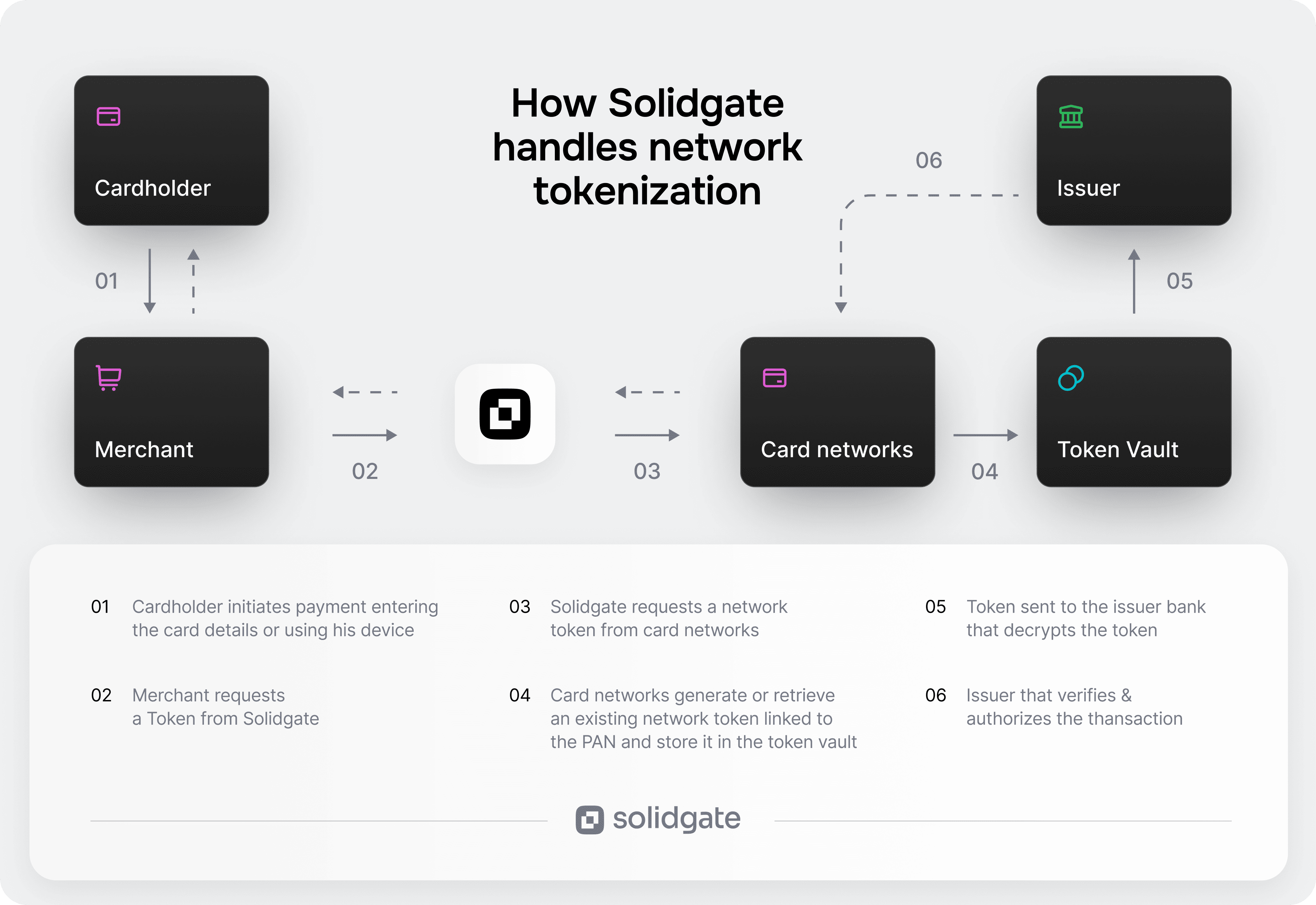
shortens checkout for returning customers and strengthens payment performance for subscription renewals at the same time.
When a customer's card is tokenized via Visa Token Service (VTS) or Mastercard Digital Enablement Service (MDES), the stored credential is a network-level token – not a raw card number. On the next checkout – or any subsequent recurring charge – the token is used directly.
The business impact goes further than UX. Tokenized transactions are treated as higher-trust by card issuers because the credential comes from the payment network's own vault. That trust translates into – up to 15% higher acceptance compared to standard card transactions.
Zeely, for example, saw conversion rates increase by 7–14 basis points after VTS/MDES network tokenization went live. For a business processing subscription at volume, that's meaningful additional revenue on transactions that would otherwise have declined.
Acquirer-agnostic tokenization also protects payment continuity when a merchant adds or switches acquirers. Customers don't re-authenticate; the token travels with the credential.
6. Build subscription-specific trust signals
The payment step is where security doubt peaks. Optimize your checkout page with:
- SSL certificate indicators and PCI DSS compliance markers. Security badges that tell the customer the site is legitimate. They need to be backed by real infrastructure: PCI DSS Level 1 certification, 3DS2 (3-D Secure 2) authentication, and SCA (Strong Customer Authentication) exemption management.
- – Visa, Mastercard, PayPal, Apple Pay. Familiar logos reduce hesitation before card entry.
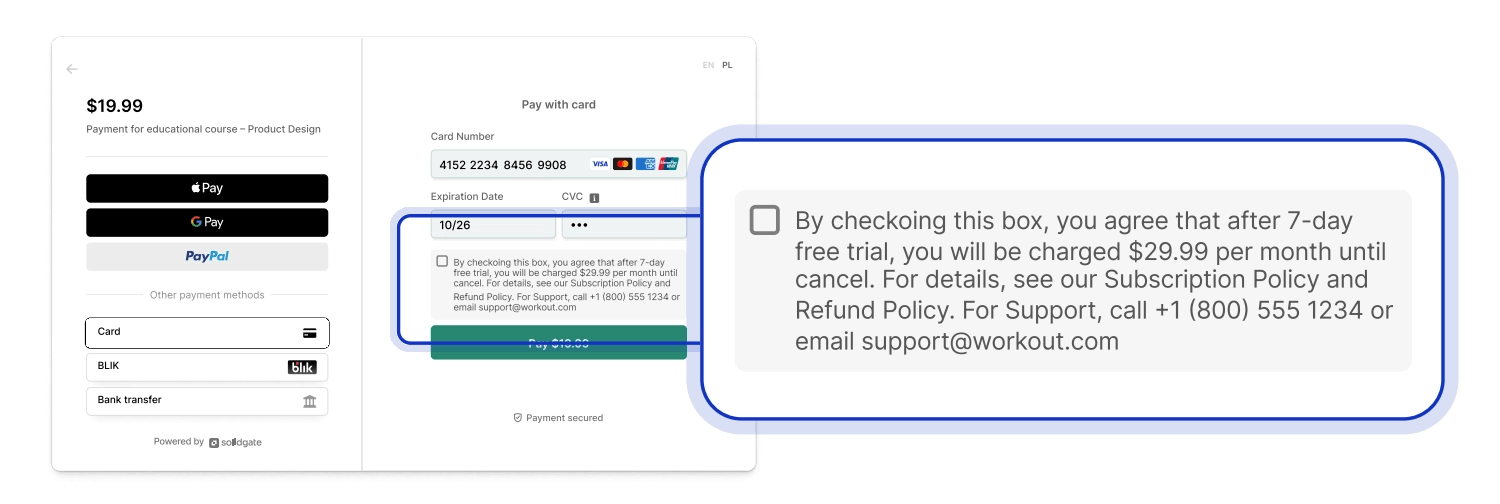
For subscription merchants, trust signals go beyond reassuring a hesitant customer – they're a compliance requirement. According to , up to 75% of subscription chargebacks are friendly fraud – unrecognized charges, forgotten trials, inaccessible cancellations. Three additional signals address this directly:
- Billing descriptor. The charge on a customer's bank statement must include a recognizable brand name and contact information. Visa allows up to 22 characters – use as many as your acquirer supports. A that doesn't match your brand generates disputes from customers who authorized the charge but don't recognize it.
- Checkout disclosure. Show the trial duration, post-trial amount, billing frequency, and next charge date on the payment screen. Visa and Mastercard require a checkbox for cardholder consent on recurring billing after a free trial.
- Cancellation policy. A customer who sees "cancel anytime" at the point of card entry is less likely to abandon and less likely to dispute a charge later.
7. Set the right expectations at the confirmation step
Most businesses treat the confirmation page as a final endpoint – order number, receipt summary, done. In practice, it's the highest-intent moment in the entire purchase flow. A customer who just completed a purchase is more receptive to a related offer, a subscription upgrade, or a referral prompt than at almost any other point.
Use the confirmation page to:
- Confirm the order with a summary and expected access timeline
- Introduce a relevant upsell or add-on while purchase intent is still active
- Set the billing cycle, next charge date, and cancellation path clearly
When payment credentials are already tokenized, a post-purchase upgrade can be authorized without the customer re-entering payment details.
Core insight: Start with what's visible – form fields, mobile layout, pricing transparency. These are accessible to any team without infrastructure changes. The authorization rate and subscription resilience strategies require payment infrastructure but they're where the compounding gains sit.
Checkout optimization benchmarks
Benchmark ranges vary significantly by industry, market, and business model. Use these as directional references, not fixed targets.
| Metric | Typical range | Target |
| Cart abandonment rate | 65–75% | Below 70% |
| Checkout conversion rate | 30–50% | 45–65% |
| Mobile checkout conversion | Historically below desktop | Equal to desktop |
| Payment method success rate | Varies by method and market | Flag any method below 80% – investigate routing or integration |
| Time to complete checkout | 4–8 minutes | Under 3 minutes |
| Form field count | 11–15 fields | 8 fields |
| Authorization rate | 80–90% | 85–95% |
| False decline rate | 2–5% | Below 1% |
Core insight: Benchmarks tell you where to set the bar. Your own trend line – improving from your specific baseline quarter over quarter – tells you whether the work is actually moving it.
How Solidgate approaches checkout
Solidgate is a with 100+ acquirer connections and alternative payment methods available through a single integration. It covers the full payment stack: checkout form, routing, acquiring, subscription billing, and revenue recovery. Here's how that works at the checkout level.
Adapt the checkout to every market automatically
TheSolidgate auto-adjusts language, currency, and payment method display based on the customer's detected location. A customer in Poland sees BLIK and prices in PLN. A customer in the Netherlands sees iDEAL and prices in EUR. New markets don't require a separate checkout configuration – localization is built into the form itself, not layered on top.
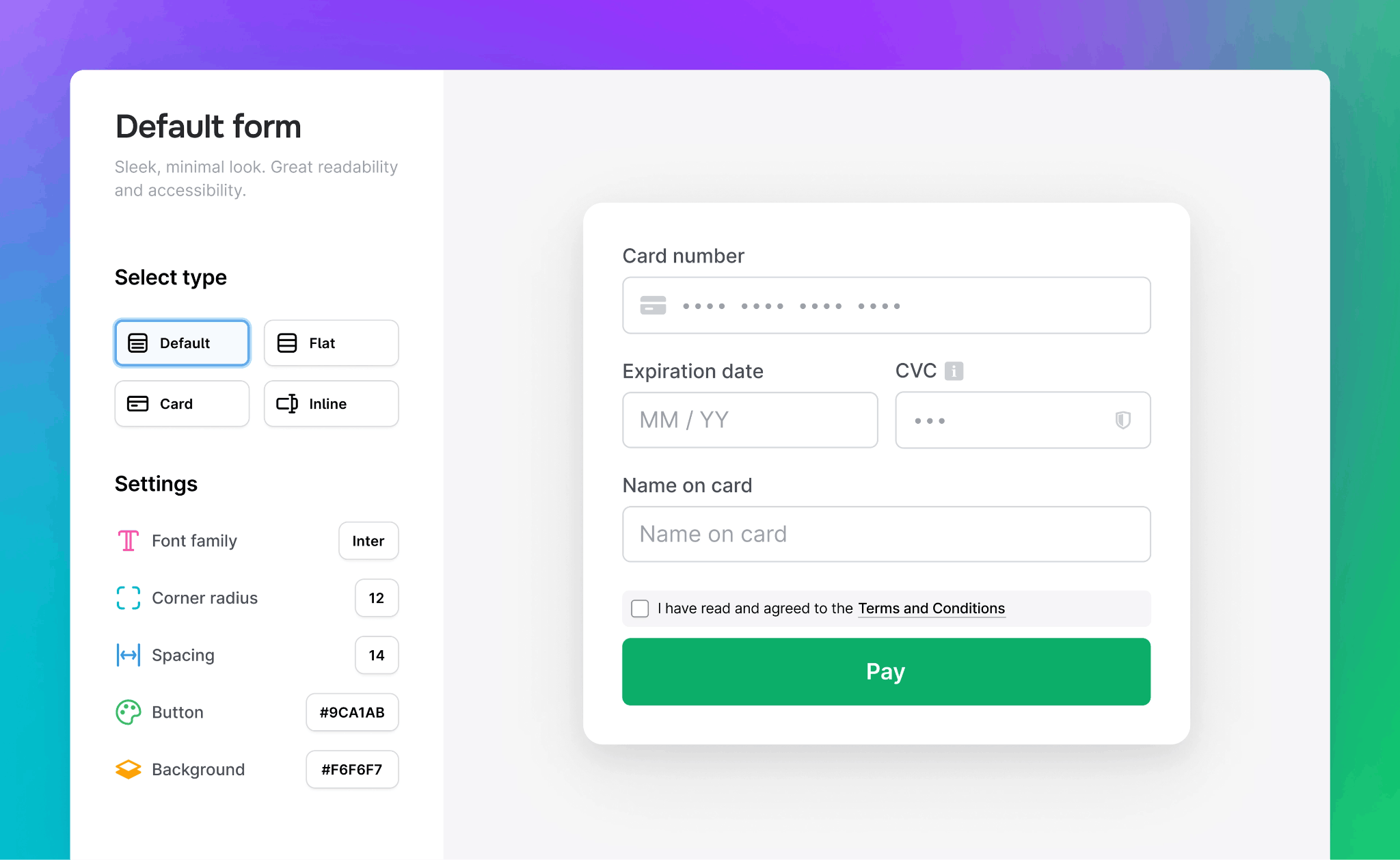
For returning customers, input fields pre-populate from previous purchases. Combined with VTS and MDES network tokenization, returning subscribers confirm payment rather than re-enter it. The form loads via a decentralized CDN, which reduces load times across geographies – one of the more underappreciated causes of mobile abandonment.
For merchants not ready to embed a full checkout form, is a hosted payment page that can be shared via email, messaging, or any channel – no integration required. It applies the same localization and payment method logic as the Payment Form, making it a practical starting point before a full checkout build.
Route each transaction to its best chance of approval
reads the signals on each transaction – card type, issuing bank, country, amount, risk score – and routes to the acquirer most likely to approve it. If that acquirer declines, cascading logic automatically retries through a different one before the customer sees a failure.
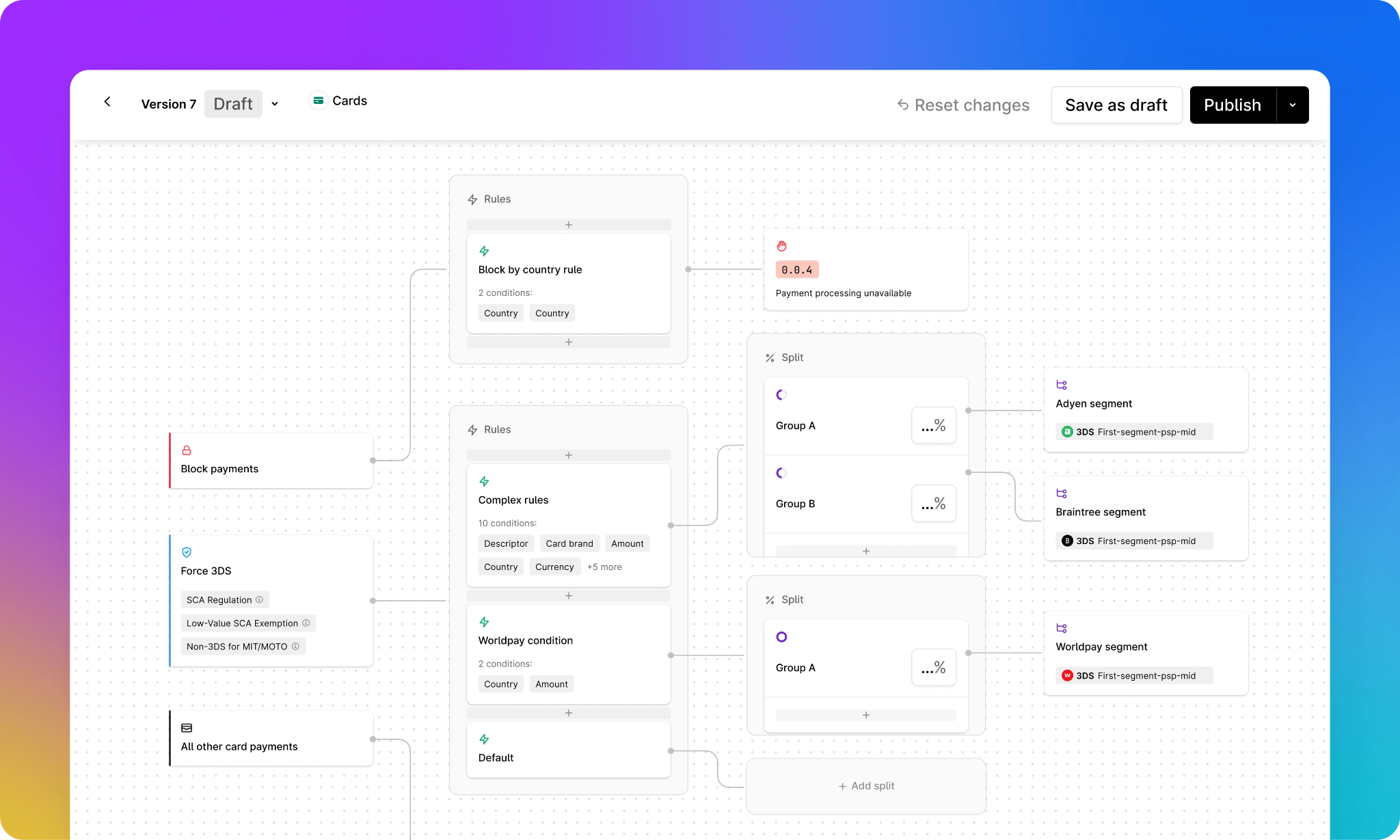
A declined transaction at checkout looks like a checkout failure to the customer. But the cause is often routing, not the form. Zeely's +8 percentage point approval rate improvement came primarily from routing work – moving from tier-2 to tier-1 acquirers and applying network tokenization to increase issuer trust. None of that was visible on the checkout page. All of it showed up in authorization rates.
Launch on local rails without the procurement overhead
Every new market requires an acquirer in that market. With a pure orchestration layer, adding one means a separate KYB (Know Your Business) review, a separate contract, and separate MID provisioning. This typically takes three to six months of procurement work before traffic can flow through that route.
Through Solidgate, merchants get access to on local rails under a single onboarding and one contract, including a faster path to tier-1 acquirers like JP Morgan, Adyen, and Worldpay.
HOLYWATER TECH, a Solidgate client, expanded into the US and LATAM with Worldpay, Ebanx, and Bamboo without separate acquiring relationships per market.
Read the full .
Protect subscription revenue after the first payment
applies machine learning to pick the optimal moment to retry a failed subscription charge. It factors in the customer's payment history, the decline code received, and patterns across the full merchant base.
When a card expires or is reissued, automatically refreshes stored credentials. Network tokenization means tokens survive card replacements – subscriptions keep charging without customers needing to update their payment method.
When one of our client's acquiring banks closed, all tokens were preserved on the Solidgate side. All active subscriptions transferred to new acquirers with near-zero subscriber impact – charges kept processing without interruption, and no customer was asked to re-enter their payment details.
Core insight: The strategies in this article compound when the infrastructure underneath handles localization, tokenization, routing, and revenue recovery natively. Managing each layer separately is the ceiling most scaling merchants are trying to break through.
What checkout optimization looks like in practice
Checkout problems don't show up in aggregate data – only when you break drop-off down by market, device type, and payment method. Here's what that revealed for our client.
MEGOGO – a streaming platform serving millions of subscribers across Eastern Europe and Central Asia – had two checkout problems in 2024. Smart TV subscribers hit a card authentication step their devices couldn't complete, and Polish customers abandoned at payment because BLIK wasn't in their checkout.
Working with Solidgate, both were diagnosed and fixed:
- A compliant processing flow for Smart TV removed the authentication barrier without breaking PSD2 requirements.
- BLIK added with localized routing for Polish issuers recovered the market-specific gap.
- Smart retry logic on the renewal layer addressed the churn that follows failed initial payments.
Result: +3.5% payment conversion, -5% subscription churn, €100K in annual cost savings.
Read the full .
Fix the visible. Then fix the rest
Most payment teams focus on what's visible – form fields and mobile layout. These matter. But the largest recoverable gaps are in layers two and three – authorization rate and renewal resilience. Standard UX analytics won't show them.
Fixing layer one lifts conversion. Fixing all three compounds it. A merchant who reduces form fields and adds BLIK in Poland will see a lift. Adding routing fixes, network tokenization, and smart retry logic will compound gains on transactions they're already capturing.
If you're not sure which layer is your biggest gap, to map your current setup and identify where the improvements would move the needle.

€100K saved, +3.5% conversion
How MEGOGO scaled global streaming payments with Solidgate
Frequently asked questions
Checkout flow optimization covers everything between a customer's intent to pay and a completed transaction – form design, payment methods, mobile experience, trust signals, pricing transparency, authorization rate, and post-purchase billing. The goal is to reduce the share of customers who start the payment flow and don't finish it.
Good performers sit in the 45–65% range, with top performers reaching the upper end. Mobile checkout conversion has historically trailed desktop but the gap has largely closed – if your mobile rate is significantly below desktop, UX friction is likely the constraint.
Start by measuring where customers drop off – checkout conversion rate, authorization rate, and mobile checkout conversion each point to a different layer. Then address in order: reduce form fields to the minimum required, add the payment methods your markets prefer, and show pricing clearly before the payment step. For subscription businesses, retry logic, network tokenization, and involuntary churn often represent a larger revenue gap than checkout UX.
Baymard data shows missing payment methods drive 10% of checkout abandonment but that understates the impact where one local method dominates. In Poland, a checkout without BLIK loses a disproportionate share of users. In the Netherlands, missing iDEAL has a comparable effect. Local payment methods tend to authorize at higher rates with domestic issuers than international card networks. The conversion impact extends beyond the payment selection step to successfully completed transactions.
Recent articles